Lynara Review - Precise Multi-Layer System Architecture Design Tool
The Flat-Diagram Trap
Every senior engineer has lived through this. A new feature needs to touch three services, a database, and a queue. To explain it, you open a drawing tool and sketch boxes and arrows. It works for the moment, but the diagram is a lie the moment the code changes. Someone adds a service, renames a module, or moves a boundary, and the diagram is now misleading everyone who looks at it.
Modern software is not flat. It is a stack of layers, from the browser down to the infrastructure, each with its own boundaries, responsibilities, and connections. Yet almost every tool we use to document it forces us to flatten that stack into a single two-dimensional plane. The result is diagrams that tangle layers together, obscure relationships, and go stale within days.
That is the exact problem Lynara was built to solve. In this review, we take a close look at how this modern software architecture visualization tool uses a genuinely novel multi-layer design to keep complex systems legible, accurate, and alive. Whether you are modeling microservices, a modular monolith, or a hybrid server setup, Lynara aims to produce documentation that stays useful.
There is a detail worth noting up front: Lynara is developed in Switzerland, a country whose reputation for precision engineering is well earned. Whether this architecture diagram tool upholds that standard is exactly what this review sets out to determine.
Why Architecture Design Has Gotten So Hard
The difficulty of keeping architecture documentation accurate has grown along with the systems themselves:
- Systems keep getting more complex: A modern application touches dozens of services, databases, and infrastructure components wired together in intricate ways
- Teams need a shared mental model: Distributed teams cannot stay aligned without a clear, common view of the system at every level
- Documentation rots quickly: Architecture docs fall out of date fast, creating knowledge gaps and slow onboarding
- Communication is a bottleneck: Aligning technical and non-technical stakeholders on a design is hard without clear visualization
- Early decisions compound: Weak architecture choices made early become expensive technical debt that is painful to unwind
Lynara attacks all of these through one unifying idea: capture architecture as structured layers rather than flat drawings.
The Multi-Layer Philosophy
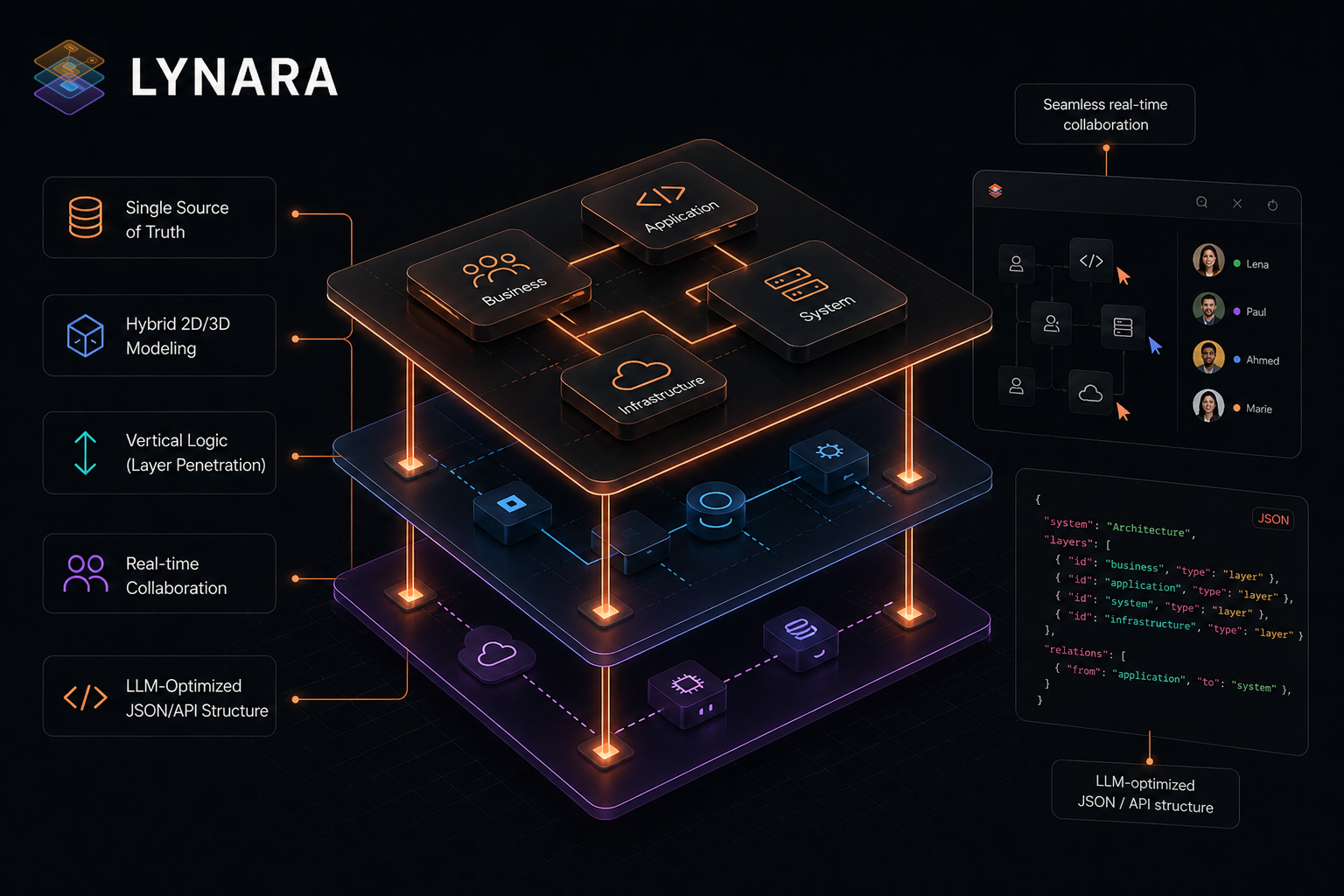
Lynara was created because no existing tool could map the vertical logic of a real system. Most diagram tools let you draw; Lynara tries to understand. The core concept, stated plainly on the platform's own pages, is that it recognizes the vertical logic of your system, from cloud infrastructure up to the user interface, rather than just giving you an empty canvas.
This philosophy translates into concrete behaviors:
- Layer separation: Split a complex IT system into logical layers, from UI through services to data
- Vertical logic: Navigate through layers with layer penetration, seeing exactly how each connects to the others
- Full visibility: Keep complete awareness of all technical layers across the project
- Scalable design: Build architecture structures that are future-proof and easy to extend
- Clear boundaries: Define clean interfaces between layers to keep the system maintainable
This multi-layer architecture design approach is the fundamental differentiator. Instead of a confusing flat map, you get a hierarchy that mirrors how the software is actually built.
A Single Source of Truth
The biggest problem with traditional architecture documentation is decay. Diagrams live in a wiki, drift from reality, and slowly become fiction that people still trust. Lynara reframes this around the idea of a Single Source of Truth:
- Structured data, not images: Your architecture is stored as structured, queryable data
- Machine-readable: An LLM-optimized JSON/API structure makes your architecture readable by AI tools
- Real-time sync: Always current, synchronized automatically across the team
- Version-control friendly: Store architecture alongside your code like any other artifact
This is a meaningful shift. Architecture becomes something you can query, diff, and review, instead of a picture that decays.
The Interactive Architecture Canvas
The canvas is the heart of the tool, and it is where Lynara feels most alive. Unlike static drawing tools, the interactive canvas supports:
- Visual planning: Design architecture visually with intuitive drag-and-drop
- Real-time updates: Changes reflect instantly across all connected views
- 3D exploration: Visualize complex software landscapes in three dimensions for better spatial reasoning
- Zoom and navigation: Move smoothly between a high-level overview and detailed components
The canvas is the central hub where design happens, making it easy to explore and refine a system without losing the big picture.
Cloud-Native Architecture Support
For teams building modern applications, Lynara includes capabilities tailored to cloud-native design:
- Microservices design: Model complex microservice architectures with clear service boundaries
- Container awareness: Visualize container relationships and orchestration patterns
- Distributed systems: Map connections between distributed components effectively
- Hybrid infrastructure: Design hybrid server concepts spanning cloud and on-premises
This makes the platform especially relevant for teams working with Kubernetes, Docker, and similar technologies.
Export and Collaboration Features
A highlight of this review is the export system, which is unusually well thought out:
- LLM-optimized export: Export your entire system landscape as machine-readable mapping for AI/LLM consumption
- JSON export: Machine-readable architecture data for other tools
- LLM-Markdown export: A human-friendly markdown format for documentation
- Mermaid export: Generate Mermaid diagrams for markdown docs
- PNG export: High-quality images for presentations
- Tool migration: Import designs from other architecture tools
- Version-control friendly: Store architecture as code-like artifacts
Productivity is also built into the workflow with thoughtful keyboard shortcuts: double-press to create nodes, standard copy/paste and undo/redo, arrow-key scrolling between layers for precise placement, and shift-click multi-select. These turn Lynara from a diagram tool into a professional-grade environment.
Integrations
Lynara embeds interactive architecture maps into Confluence, Notion, and Google Workspace, keeping documentation in sync with live designs. For development and DevOps, it connects to GitHub, GitLab, and Bitbucket to automatically sync services, repositories, and CI/CD pipelines, track pull requests and commits, and visualize the whole development infrastructure. Enterprise authentication supports Google Workspace, GitHub, and Microsoft SSO.
Browser-Based Accessibility
A practical advantage is that Lynara runs entirely in the browser:
- No installation required
- Cross-platform compatibility from any modern browser
- Real-time collaboration with teammates
- Always up to date with no version conflicts
Who Should Use Lynara
Software architects and system designers can create precise multi-layer designs, document decisions, and maintain living documentation.
Development teams can align on system structure before coding, onboard new members faster with clear visuals, and track how architecture evolves.
Technical leads and engineering managers can make architecture visible to leadership, plan for scalability, coordinate sub-teams, and demonstrate technical thinking.
Enterprise architecture teams benefit from standardization, compliance documentation, and multi-team collaboration at scale.
Pricing
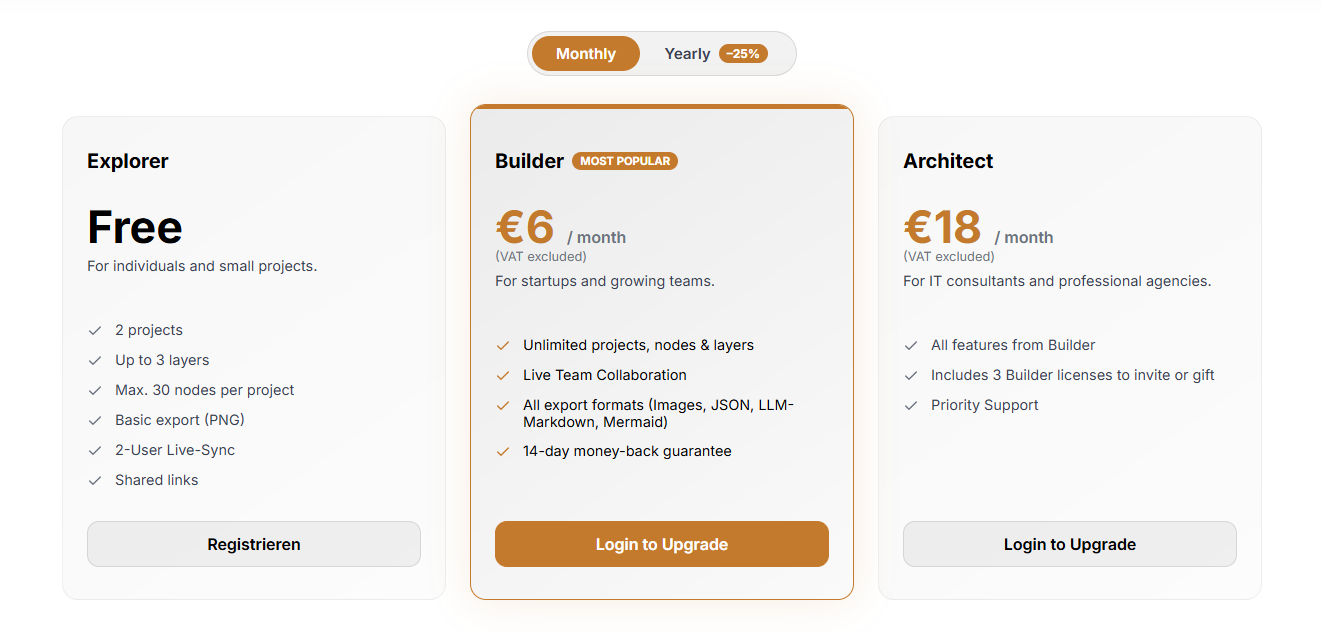
Lynara keeps pricing simple and transparent:
Explorer (Free): 2 projects, up to 3 layers, max 30 nodes per project, basic PNG export, 2-user live-sync, and shared links. Enough to evaluate the platform with no financial commitment.
Builder (€6/month) - Most Popular: Unlimited projects, nodes, and layers, live team collaboration, all export formats (images, JSON, LLM-Markdown, Mermaid), and a 14-day money-back guarantee. A 25% annual discount is available. Ideal for startups and growing teams.
Architect (€18/month): Everything in Builder, plus 3 Builder licenses to invite teammates or gift to clients, and priority support. Designed for consultants and agencies managing multiple client projects.
Universities & Schools (Free): A free plan for students and educators, verified via university or school email, covering 2000+ institutions worldwide, with all Builder features. It supports the next generation of software architects.
The Layers in Practice
Lynara's multi-layer model typically maps to these layers:
User Interface Layer
The top layer where users interact: web interfaces, mobile apps, API gateways, and client-side components.
Services Layer
The business logic and processing: microservices, serverless functions, business logic components, and integration services.
Data Layer
Where information lives: SQL/NoSQL databases, data warehouses, caching, and file storage.
Infrastructure Layer
The foundation: cloud services, container orchestration, networking, and security.
Separating these layers lets teams work on one without disturbing the others, making evolution far more manageable.
How Lynara Compares to the Status Quo
| Aspect | Status Quo | Lynara Platform |
|---|---|---|
| Tools & Documentation | Chaos of tools & outdated wikis | Single Source of Truth |
| Data Format | Images (PNGs) instead of structured data | Hybrid 2D/3D system modeling |
| Thinking Approach | Horizontal thinking (just diagrams) | Vertical Logic (Layer Penetration) |
| Updates | Tedious, manual updates | Seamless real-time collaboration |
| AI Compatibility | No AI-readability of the architecture | LLM-Optimized JSON/API Structure |
What Makes Lynara Unique
- Authentic multi-layer framework: Built from the ground up for layered thinking, not retrofitted onto flat diagrams
- Swiss precision: The attention to detail reflects Swiss engineering values
- Modern tech stack: Browser-based with contemporary design
- Developer-friendly: Keyboard shortcuts and efficient workflows
- Future-proof design: Native support for cloud-native, microservices, and distributed systems
Final Verdict
After thorough testing, this Lynara review concludes it is a compelling choice for teams seeking a modern software architecture visualization tool. The multi-layer design approach is genuinely innovative, offering clarity that traditional diagram tools cannot match.
Review Summary
- Architecture Design: ⭐⭐⭐⭐⭐ (5/5)
- User Experience: ⭐⭐⭐⭐½ (4.5/5)
- Feature Set: ⭐⭐⭐⭐⭐ (5/5)
- Collaboration: ⭐⭐⭐⭐⭐ (5/5)
- Value for Money: ⭐⭐⭐⭐⭐ (5/5)
- Overall Review Score: ⭐⭐⭐⭐⭐ (4.8/5)
Key Takeaways
Lynara excels at: multi-layer architecture visualization, complex system documentation, team collaboration, cloud-native and microservices design, and browser-based accessibility.
Consider alternatives if you need: extremely simple diagrams, desktop-only solutions, or deep UML compliance.
Final Thoughts
For software architects, development teams, and technical leaders seeking a modern system architecture design tool, Lynara delivers on its promise of precise multi-layer system design. The browser-based platform, combined with thoughtful features like keyboard shortcuts and robust export options, makes it practical for real-world use.
The multi-layer approach is not marketing; it is a fundamental shift in how we think about and communicate software architecture. Whether you are designing microservices, planning cloud migrations, or documenting existing systems, Lynara provides the clarity and structure modern development demands.
Experience the difference. Get started for free with no strings attached, no credit card, just architecture.
Ready to transform your architecture design workflow? 👉 Start Designing with Lynara today.
Tags
# Review# Lynara# software architecture visualization tool# system architecture design tool# architecture diagram tool# software architecture platform# Multi-layer architecture design# Cloud-native architecture# Microservices architecture# Architecture mapping# Interactive architecture canvas# System design visualization# Enterprise architecture# Architecture documentation# LLM-optimized export# Mermaid diagram export# Team collaborationQuery Streams Review - The Ultimate Power Query Alternative for Real-Time SQL Data in Google Sheets & Excel
About Us
Follow for new blogs
Subscribe to our blog
Subscribe to Newsletter
Subscribe to our newsletter to get the best products weekly.